Monday, November 18, 2013

Universal tea making guide

More specifically, a universal guide to how long you need to keep the tea bag/leaves in the hot water without ruining your tea.

Tea Tutorial
Enjoy

ps - I'm not totally sure but I think white&gold tea goes together with green&black

Wednesday, November 6, 2013

The Canyon CNA-BTKB01B (or CNA-BTKB01W) Bluetooth Keyboard

Hello.

This will be a short review on the Canyon CNA-BTKB01B (black, CNA-BTKB01W is the white version) bluetooth keyboard.

I just bought this keyboard two weeks ago (my bad) to use at work on my Windows 7 machine because of its sleek flat keys and simple layout (kind of an Apple Wireless Keyboard impersonation only with a lower price tag; again my bad). 

I used it for two days at work and unfortunately all I can say is this
 - the right shift key did not press well on all angles
 - when the PC had been sleeping for the night, when I wanted to get started the next day, the keyboard would not react and had to be reconnected (this means removing the bluetooth keyboard from Windows and reconnecting it using the keyboard hardware connect procedure)
  - during the second day, this would also happen at random times
 - during the second day, certain keys would not register the key press (and get this) in certain applications
 - while typing a long text some keys would appear twice on the screen (I consider myself as an advanced typist and this never occurs to me)

Basically what I am trying to say is that this keyboard is of (very) poor quality. Fortunately, I managed to return it and get my money back. So.. I'm guessing it's an ugly keyboard or .. Apple's?

PS - these two (one and two) are the only documents I could find on this device (other than the seller's website information)

Thursday, August 29, 2013

Apps that are turning Windows 8 style


Now that Windows 8 has been released for some time, it seems apps other than Microsoft's are turning to the metro, flat Windows 8 style.

The first (and obvious) set of apps are the ones in Microsoft Office 2013

MS Outlook 2013

MS Lync 2013


MS Word 2013

MS Excel 2013

MS Powerpoint 2013

And we start to see some reaction from the outside community starting with Evernote. Their latest beta release (Evernote 5) uses the metro UI design.

Evernote 5 for Windows

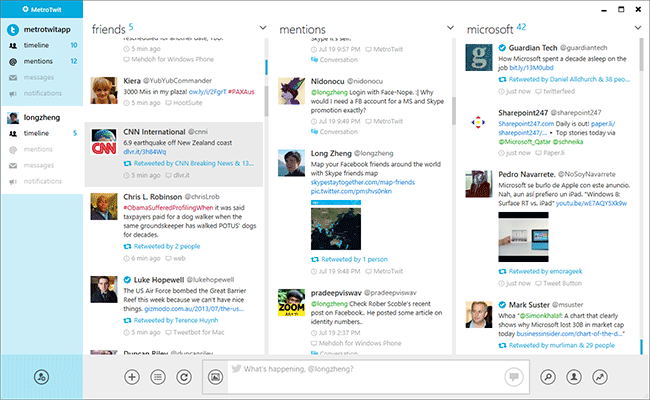
Lastly, although not as famous, a twitter client for Windows desktop, MetroTwit uses the same UI style.

MetroTwit, a Windows Twitter client

The movement is still very slow, but I believe more and more apps will be forced to start using the Metro style if they want their apps to fit in the new Windows OS. Is this a good thing? I say it's a natural thing and that we'll all come to get used to it (if not like it) and eventually embrace it.

Enjoy.


Thursday, April 18, 2013

A simple, elegant and good-looking lightweight File Manager for Nexus 4 (and Android in general)

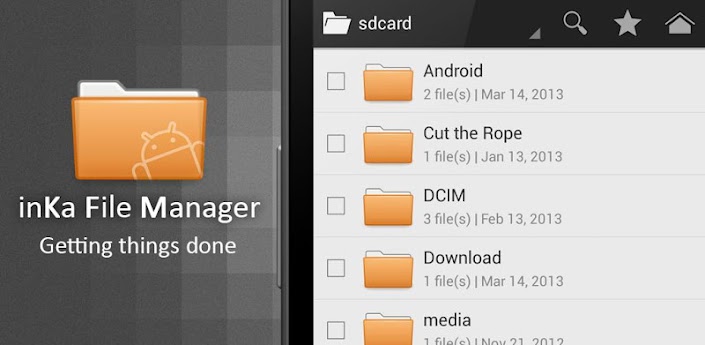
inKa File Manager
inKa File Manager, a simple, yet elegant Android File 

I just noticed that the Nexus 4 does not come with any File Manager app pre-installed. So I started searching for a good looking app to serve my purpose. (I rather enjoyed the look of the i5800's File Manager, in spite of its simplicity; see an image below)

The default File Manager shipped with Samsung Galaxy products (more specifically i5800)

The app has to be beautiful and confirming to Jelly Bean's UI conventions would be a definite plus. 

Although all Google searches for such an app gives you the popular (and also regular) results like Astro File Manager, ES File Manager etc.; they were not what I'm looking for. Their functionality list is large, but their UIs are ... basically ugly (I found Astro to be the best in popular top).

Thus, I went ahead and looked at more obscure apps and found inKa File Manager which seems a simple, nice-looking, even elegant app. Its main screen is not crowded with all kinds of information  

inKa's main screen

and more options are only at a swipe away.


Left swipe
Right swipe

Enjoy

Wednesday, April 17, 2013

Fixing Nexus 4's low volume for headphones

Google's Nexus 4
After receiving and setting up my new Nexus 4 I went forth and continued my audiobook listening activities only to notice that (even at maximum volume) the device was nowhere near my almost top notch previous phone's volume (the Galaxy 3 i5800), which basically blew the Nexus out of water.

Thus, discouraged I started looking for answers and found these two (quite popular) bugs signalled on the Nexus 4


And became even more discouraged (and I had not plan on rooting a new phone in it's first week; and even worse a Nexus) and after trying out Poweramp which after tweaking the volume settings a bit seemed to provide better volume for my mp3s (than Google Play Music did; I went back and forth listening to the same 5 seconds on each player), I went back to Google Play Music and discovered that it too had an Equalizer Settings section (but only on the specific playback screen, the one with the large album photo) which was strangely disabled. After enabling it I can safely say that it outperformed Poweramp, and although I haven't tested it thoroughly I think the volume problem will not bother me any time soon.

Detailed Instructions

So again, open your Google Play Music app and start playing a track. Now, go to the view with the large album cover

The large album cover screen

and hit the menu button in the top right and select Equalizer. You should be presented with this screen

The life-saving equalizer

Enable the equalizer and voilà. Good volume to all! 

Update - The Google Play Music app has been updated in the mean time and reaching the equalizer settings is much more intuitive. Just open the app, hit the menu button, select Settings and then Equalizer and you're there.

Enjoy

Friday, March 29, 2013

Duolingo, really the best way to learn a new language

http://duolingo.com/
Duolingo, an interactive language learning platform

Duolingo is a website designed to help a learn a foreign language and I believe it's brilliant at it.

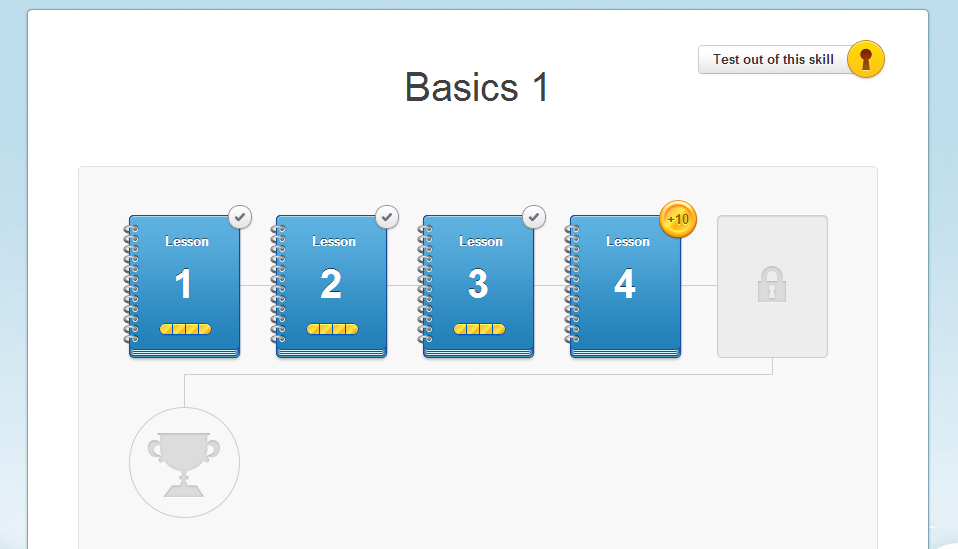
The experience is similar to a game including a friendly and nice-looking UI, rewards/coins received after completing exercises and a roadmap displaying your overall progress.


The Basics 1 Lessons


The Roadmap and other status information

The learning is very simple and interactive. It gradually introduces new words and grammar concepts and also requires you to translate phrases, listen to and write sentences and even translate articles from the web. It also keeps learning statistics and allows you to work on your weak spots.


A simple translation exercise

Currently only a few languages are supported

  • Spanish
  • English
  • French
  • German
  • Portuguese
  • Italian
and as for the mobile platform, only iOS is blessed with an app, but an Android promise exists towards the end of 2013.

Enjoy

Thursday, February 14, 2013

Android Music Players that keep progress


If you're someone like me than you enjoy a good audiobook on your Android phone during your daily commute once in a while. And let me tell you, not all audiobooks are finely grained to about 3 minute files. Some entire books span 2 mp3 files. 

Now imagine that while listening to chapter X from the first gigantic file, you run into a situation where you have to pause the book, perform your daily activities (world-wise and android-wise) and it just so happens that the music player (you are using) is kicked out of the Android's RAM.

Then, unless your player app knows how to save your progress, you're pretty much doomed to haunt the file's progress bar (which at several hundred MBs per file does not do you any good) to find that one part you were listening to.

In conclusion, these are tested apps that keep listening progress even if the app is forced out of memory
While there may be other apps (in that case, please throw me a comment below) that work, I can tell you this, the default (Froyo on i5800 in my case) music player does not solve our problem.

So, enjoy your listening,
Bye

Friday, January 25, 2013

Google Tasks, the Chrome Extension

It, has recently come to my attention. The extension looks pretty nice, especially as a Chrome app.


The app also enjoys nice and quick authentication method from Google. So, set it up and nice tasking!

Thursday, October 11, 2012

Beautiful Windows Desktop Apps

A list of eye-pleasing Windows desktop apps ('cause God knows there aren't many of them):
Feel free to add suggestions in comments and I willl update the list.

ps - Other noteworthy lists include:

Enjoy

Monday, October 1, 2012

Google Calendar compatibil RDS

Serviciul oferit de Google, Google Calendar permite (de mult timp) utilizatorilor să primească notificări (reminders) legate de evenimentele existente în calendar. 

Pentru a activa această opțiune, numărul de telefon trebuie activat cu ajutorul unui cod trimis prin SMS de către Google la numărul specificat. Până recent, pentru cei ce utilizează numere de telefon RDS, acest SMS nu se făcea văzut, iar aceasta era pentru că RDS nu se afla printre lista de provider-i recunoscuți. Fapt care nu pare să se întample nici acum :) Dar măcar SMS-ul ajunge, iar evenimentele se fac auzite :) (sau citite pe telefon)

Enjoy

Wednesday, September 12, 2012

Performing mvn release:prepare without tests

If for some reason (e.g. tests only run in dev environment) you wish to skip running tests during the Maven release process, this is a trick that comes in handy

mvn release:prepare -Darguments='-Dmaven.test.skip=true'

The explanation can be found here at point 6. (the short version is that you have to pass the argument to the release plugin instead of the usual command).

Wednesday, August 29, 2012

Hide BookmarksBar

Dacă vă place modul în care Chrome face managementul bookmark bar-ului, dar sunteți în faza Firefox, Hide BookmarksBar este răspunsul pentru (aproape) toate problemele voastre.

Cu această extensie puteți să
  • afișați/ascundeți bookmark bar-ul cu o combinație de taste
  • afișați bookmark bar-ul doar pe pagina de "New tab", iar în rest să fie ascuns
  • și altele (ce-i drept, mai puțin importante)
 Enjoy

Friday, August 24, 2012

Why the next Galaxy Nexus must have quad-core CPU

I know there are a ton of rumors going around (oddly identical) that the new Nexus phone will be just a tad better than the Galaxy Nexus (slightly better processor: dual-core 1.5 Ghz, memory card support, better camera: 8Mp and an extra "HD" added to the display). And I think we can all agree that this is a pretty lousy update. But is this what Google really has planned? I mean, the Nexus 7 just came out, it's cheap (about $200) and most importantly it's quad-core. So wouldn't it make sense for the new Nexus phone to have at least a quad-core CPU? if not cheap as well?

Also, since I've reached this point, I would have to say that upon further thinking, the best decision (Android-phone-purchasing-wise) would probably be to wait out until the next Nexus phone with a quad-core, because that is pretty much the top of the hardware upgrades (sure they, can add more RAM and better memory but it won't make much of a difference). And if you reached the top of the hardware that means that future upgrades will mostly be software-based (which since you're buying a Google phone) you're pretty much set up. 

So my recommendation is to wait until the next Nexus with quad-core. (I hope I'll make it..) 

Thursday, August 23, 2012

Why the best Android phone is Galaxy Nexus (and should I buy it?)

If you stop to think about it, the best Android phone.. should (I think) deliver the best Android experience. I am right? I mean, right now, I don't have the best Android phone (not even close) and it looks like I'm not going to see Gingerbread :) (except for custom ROMs, but that's another post). So what I would want from a nice Android phone is to get all Android updates, I mean ... I don't want to be greedy but at least Apple-like support (the next 3 OS upgrades or so). Now that is my ideal Android phone; and let's face it, the only way to get that is buying Google's phone: The Galaxy Nexus (in this case). I mean, sure it isn't the fastest candidate on the market, but are you going to be happy with a One X or S3 that after Jelly Bean might be left out staring at the sun? I know I won't. 

But still.. I hope it's not getting too slow.

Some people agree, at least this guy does. Should I buy it?

Tuesday, August 21, 2012

Forcing TaskRejectedException in Spring

Suppose (for testing purposes) you want to force a TaskRejectedException when using Spring Integration channels. All you have to do is
  • send a reasonable number of objects to the channel (let's say a minimum of 5)
  • configure your queue capacity to .. 0
  • and (important) set the thread-pool size to (as low as you can) 1
I'm using a task executor in this example:

id="someExecutor" keep-alive="120" pool-size="1" queue-capacity="0"


Good luck

Thursday, May 24, 2012

Kyrillos' ROM - Bring back the spark to your Samsung Galaxy 3 (i5800)

Samsung Galaxy 3 (i5800)
Hello there all you i5800 fans out there!

I'd like to share with you a recent discovery I've made. If you're someone like me, then your constantly trying to improve your phone, make it faster, prettier and up-to-date with all things tech.

Considering that I've pretty much given up on the idea that any upgrade passed the Froyo (2.2) one posted here is ever coming for our device, I've started to look at the "exciting new world of custom ROMs". After looking at a couple and noticing that most of them contain the dreaded  

What's not working

section, I almost gave up. [Dramatically] Towards the end I found Kyrillos' ROM which seemed quite promising. Today I can proudly announce that this is Day 4 of usage and besides seeing no problems whatsoever, I can safely say that I've very pleased.

Kyrillos' ROM with custom lock screen

Among the top features I would have to say
  • a fresh new Gingerbread-ish look
  • more space for installing apps (+ the possibility to convert the SD card to internal memory -> a lot more apps) mainly due to removed Samsung-nailed-to-the-OS apps
  • a new Image gallery (faster I might say), (resembles the Android 3.x one)
  • pre-installed with a few launchers + multiple lock screens
  • nice OS fonts
  • rooted
  • camera app has hardware button (the power button)
  • browser seems to be loading pages faster 
These are ones that impressed me the most, but there are a few more including the possibility of over cloaking (to change the processor frequency).

As for installing, it's the easiest thing in the world (especially if you've never used the Odin tool to flash your phone), but there are plenty of tutorials on the web. The full installation guide can be found here.

Enjoy

Thursday, May 3, 2012

How to find out an Android Market app's ID

Simply go to the Android Market (Play) app in your browser (say the GMail app) like this

The GMail App in Google Play


and look at the URL

https://play.google.com/store/apps/details?id=com.google.android.gm#?t=W251bGwsMSwxLDIxMiwiY29tLmdvb2dsZS5hbmRyb2lkLmdtIl0.

The highlighted section contains the application identifier.

Monday, April 2, 2012

Gmail Tap - Un nou produs Google


Un nou produs de la Google care va revoluționa modul în care interacționăm cu smartphone-urile noastre, va deschide o nouă modalitate de a scrie email .. 

Lansat de 1 Aprilie

Enjoy

Monday, March 5, 2012

Gmail Chat notifications in Firefox

If you're a person like me (who constantly changes browsers and does not use any chat client) then (oh, and that uses Gmail) during the time interval where Firefox is the default browser and you occasionally chat with a buddy using the built-in chat in Gmail, it's a serious drag when you switch windows, continue your everyday activity and don't receive any alert that your buddy wrote something in the chat window.

Unfortunately, this feature is only Chrome available. But, by installing this Firefox extension, you can receive chat notifications even during the Firefox time interval. (the notifications UI is not as good as the one in Chrome, but it sure beats no notifications)

Thank you and Enjoy!

Tuesday, February 21, 2012

Mareste volumul fisierelor MP3

MP3Gain
In cazul in care aveti un album de muzica sau un audiobook (ca si in cazul meu) care se aude prea incet si (chiar daca e acceptabil acasa sau in spatiile linistite) in momentul in care sunteti in plina aglomeratie in oras volumul dat la maxim nu e suficient, se poate folosi MP3Gain.

Cu aceasta aplicatie puteti sa analizati volumul pieselor dintr-un director si sa ajustati intensitatea acestuia la valori specifice sau recomandate.

Din fericire, aceasta se poate gasi si pentru Ubuntu (vedeti Ubuntu Software Center). Mai jos e un mic exemplu al situatiei mele


Enjoy